

Applies to: 550s / 557s smart manifolds.
Before you start: Switch off. If connected to a refrigeration system, have a qualified technician make it safe before handling.
Open the cover
Unfold the hook and release the rear cover clip.
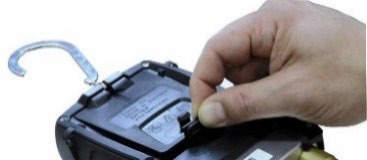
Replace the cells
Fit four AA / LR6 cells with the marked polarity. Rechargeable cells cannot charge inside the instrument.
Close and check
Engage the cover clip, then switch on.
If the issue continues: If it still will not start, stop using it and request assessment. Mention corrosion or visible damage.
Still need help with your device?
Include the model, serial number, exact error and checks already completed.
Source and applicability
testo 550s / testo 557s - Digital manifolds: Instruction manual — §11.6, pp. 69–70; §6.1, p. 7. 0970 5572 en 03 - 05.2024
Open the complete Testo operating manual ↗ · Find this model in the manual list
QRM wording summarizes the checks. Diagram excerpts © Testo SE & Co. KGaA. Follow the complete manual and warnings for your instrument. Source checked 7 September 2026.