

Applies to: 550s / 557s with compatible Smart Probes or testo Smart App.
Before you start: Check connections away from active measurement work.
Enable Bluetooth
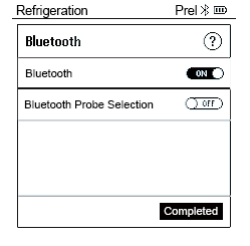
Select Bluetooth in Menu/Enter, switch ON, then confirm Completed.
Connect the devices
Switch on compatible probes; keep probes at least 20 cm apart. Open the app within range; phone-settings pairing is unnecessary.
Confirm connection
A steady Bluetooth icon indicates connection; flashing indicates searching.
If the issue continues: If connection still fails, record the probe model, phone/app version and displayed status for QRM.
Still need help with your device?
Include the model, serial number, exact error and checks already completed.
Source and applicability
testo 550s / testo 557s - Digital manifolds: Instruction manual — §8.3, pp. 31–35. 0970 5572 en 03 - 05.2024
Open the complete Testo operating manual ↗ · Find this model in the manual list
QRM wording summarizes the checks. Diagram excerpts © Testo SE & Co. KGaA. Follow the complete manual and warnings for your instrument. Source checked 7 September 2026.